ODental.Agenda.
Early access · errors may occur; we fix them fastDental scheduling software for your whole team
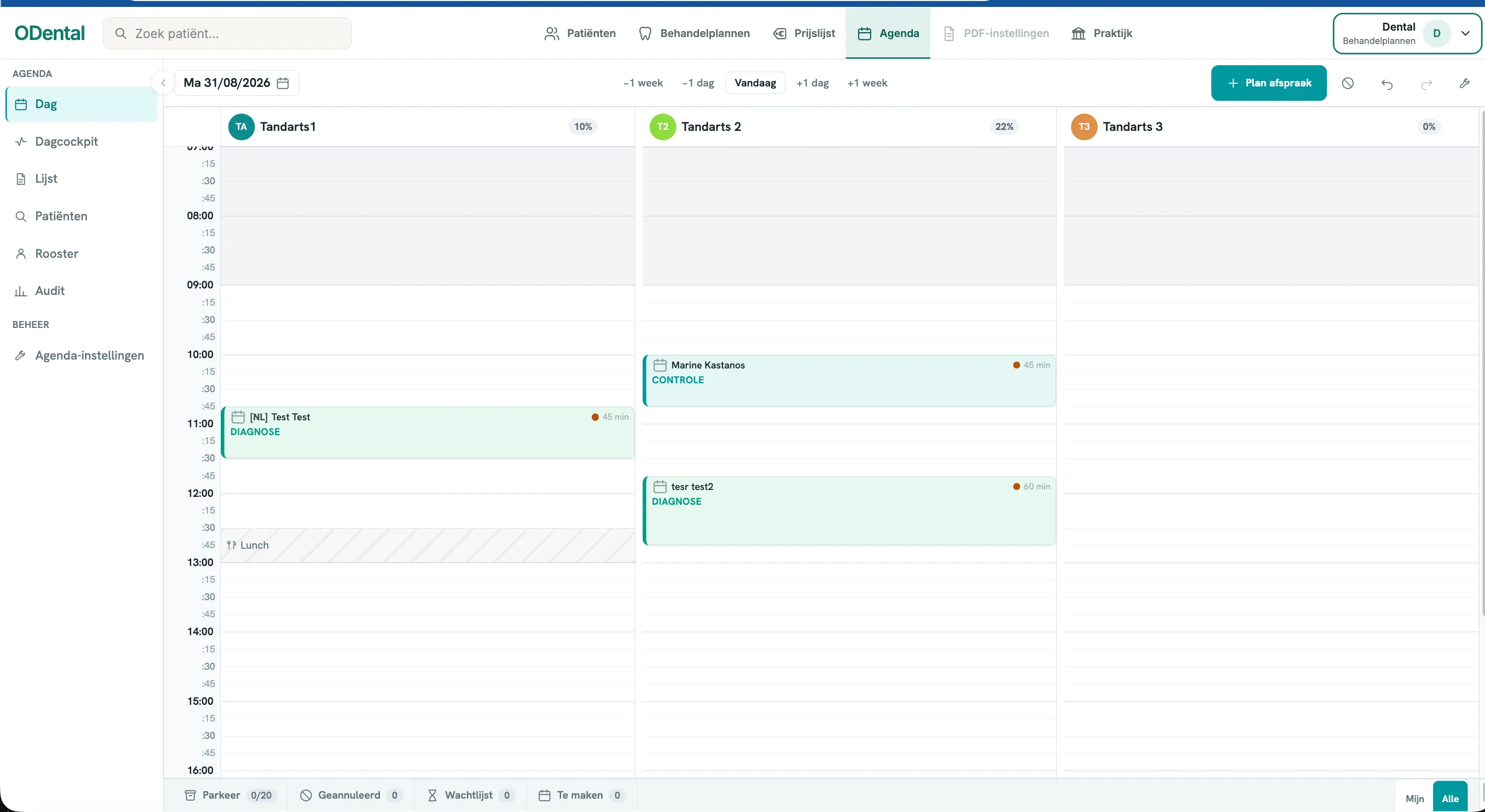
One schedule. Your whole team. Keep clinicians, rooms and appointments together in a browser view that also works on your phone.
Scheduling & planning
From €69 per month
VAT included for 1–2 active clinicians
Made for your working day
Your practice at a glance
Your schedule should travel with you.
A screenshot in the group chat is out of date as soon as an appointment changes. Open the shared schedule wherever you work, so your team can view and update the same plan for the day.
Take charge of your practice day
- Open it where you workView the schedule at reception, at home or on the move. Anyone with the right access uses their browser; an extra device needs no separate licence.
- See available capacityCheck each clinician’s occupancy while planning. See where there is room for check-ups or longer treatments.
- A rota for each clinicianSet working hours, breaks and days off. Use fixed or alternating A/B weeks and start a new rota from a chosen date; existing appointments stay in place.
- Coordinate time offRecord leave and see which colleagues are away at the same time. Administrators can review staffing before agreeing dates.
- Drag to rescheduleMove an appointment to another time or clinician. Adjust its duration by dragging its bottom edge.
- Online bookings in one placeAppointments booked online appear in the shared schedule, so your team can follow them in the same view.
- Ready for your phoneSwitch between clinicians and view, move or confirm appointments from your phone.
- Know who confirmedSee who confirmed an appointment, when and through which channel: phone, WhatsApp, email, SMS or reception.
- A history of every changeSee who changed an appointment, when it happened, and the previous and updated date and time.
- Reschedule as a teamKeep unscheduled appointments and waiting patients in shared lists. Authorised colleagues can choose a suitable slot.
Explore the details
Schedule gallery
Common questions
Dental scheduling in your practice
Can patients book an appointment online?
Online bookings can appear in the shared schedule. Your practice controls which appointment types and times are available; staff can review and change bookings and record how an appointment was confirmed.
What does dental scheduling software do?
Dental scheduling software brings appointments, clinicians, rooms and available capacity into one shared view for the practice team.
Can ODental schedule multiple clinicians and rooms?
Yes. The schedule is designed for practices with one to ten treatment rooms and shows appointments and occupancy by clinician and room.
Can I move appointments and use the schedule on my phone?
You can move an appointment to another time or clinician, adjust its duration and use the mobile view to review and update the schedule from your phone.
Can the team see how an appointment was confirmed?
Yes. The confirmation date, time, channel and staff member remain attached to the appointment so the team can review what was recorded.
Behind the software
The maker of ODental.

From the first conversation through setup and support, you work directly with Daniel, the person building ODental.
Meet Daniel- 16
- years of IT experience
- 7
- years inside dental practices
Registered in the NetherlandsKvK 98242482
Help shape a better working day.
ODental is available through early access. Everyday use may still reveal errors; report them directly and we will resolve them as quickly as possible. You can apply to test the system in your own practice free for 14 days before deciding. We are now inviting a limited number of practices to try ODental and share feedback.
Direct contact
Talk to Daniel.
Have a question about ODental or how it fits your practice? Call, email or message Daniel directly.
Your ODental
1 / 4- 01Team
- 02Modules
- 03Price
- 04Contact
Your demo request is in.
Daniel will contact you to discuss your selection and the demo.